
“What should I upload today?”
If you keep asking yourself this question, chances are your uploads will eventually slow down — and so will your channel growth.
That’s why the YouTube Studio Inspiration tab is incredibly useful.
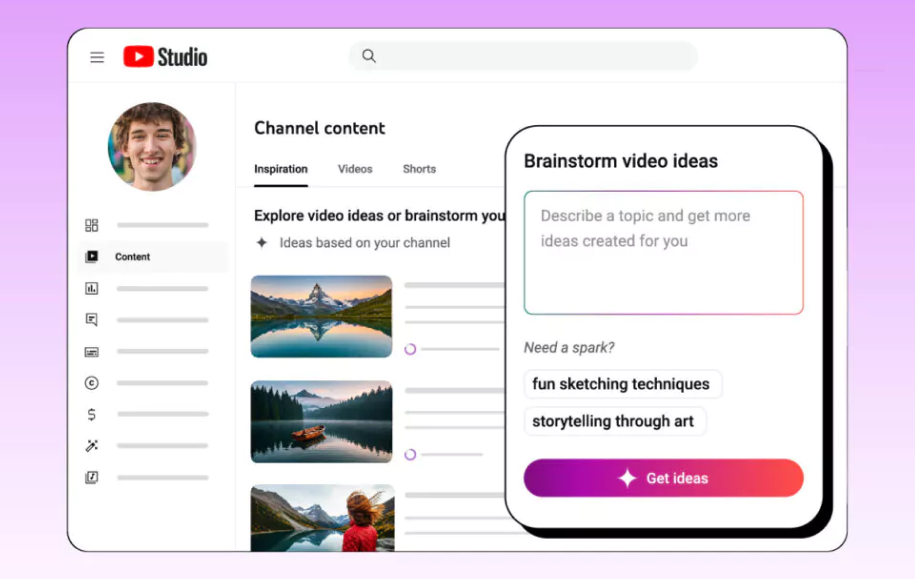
It’s not just a keyword suggestion tool — it uses your channel data to recommend topics your audience will actually enjoy, and it even helps generate titles, outlines, and thumbnail ideas using AI.
✅ 1) Why the Inspiration Tab is So Useful
The Inspiration tab gives you three major benefits:
(1) Audience-Based Video Ideas for Your Channel
When you open the tab, YouTube automatically shows around 9 recommended ideas based on your channel’s performance and viewer behavior.
(2) AI-Generated Titles, Outlines, and Thumbnail Ideas
When you’re stuck or running out of ideas, this feature helps you instantly generate a “first draft” — making it much easier to start creating.
(3) Save Ideas and Build Your Own Idea Bank
You can save strong ideas right away and come back to them later — so your content planning becomes consistent and scalable.
(The tutorial video also emphasizes that saving ideas is key.)
✅ 2) Where to Find It (Basic Steps)
According to YouTube’s official Help Center, here’s how to access it:
- Log in to YouTube Studio
- Click Content on the left menu
- Click the Inspiration tab at the top
- Review idea cards → Save them → Expand and develop them
📌 Note:
Currently, the Inspiration tab is available only on desktop, and it mainly provides English-based suggestions.
✅ 3) The Most Important Part: Turning Inspiration Into a “Daily Upload System”
The real power of this feature isn’t just getting ideas — it’s turning those ideas into daily content output.
In our bootcamp, we recommend connecting the Inspiration tab to a simple daily production loop:
🔥 Daily YouTube Video Pipeline (30–90 Minutes Total)
Step 1 (10 min) — Choose ONE Idea From the Inspiration Tab
Pick a topic you like and save the idea card.
Step 2 (10 min) — Generate a Short Script Using ChatGPT / Gemini
Use AI to quickly turn the idea into a short 30–60 second script.
📌 Copy & Paste Prompt
“Write a 30–60 second video script for this topic.
Include: a hook (first 3 seconds), 3 main points, and a short CTA at the end.
Make it short, natural, and conversational.”
Step 3 (20–40 min) — Create the Video (Two Options)
✅ Option A: Record Yourself (Smartphone filming)
- Strong authenticity and trust
- Fast and simple
- Great for creators who are comfortable on camera
✅ Option B: Use AI Studios (No filming needed)
.webp)
- Great for consistency
- Perfect when you don’t want to film
- Helps you upload daily without burnout
💡 AI Studios can be your main method —
or simply a powerful backup on days you don’t want to record.
Step 4 (5 min) — Get Feedback + Save the Next Idea
Use AI again to improve your script and sharpen retention.
📌 Copy & Paste Feedback Prompt
“Review this script and identify:
- 3 parts where viewers may drop off
- 3 improvement suggestions
- 3 stronger hook options.”
✅ If you repeat this system daily, you’ll get two things at once:
- One completed video every day
- A growing library of ideas tailored to your audience
This is how you build a content engine that doesn’t stop.
✅ Helpful Links
📌 Full tutorial video:
https://www.youtube.com/watch?v=K7XW8nSFIZU
📌 Official YouTube Help documentation:
https://support.google.com/youtube/answer/15575509
✅ Conclusion
The YouTube Studio Inspiration tab is an AI-powered feature that recommends video ideas based on your own audience data.
If you save those ideas, generate scripts with ChatGPT/Gemini, and produce videos through either self-recording or AI Studios, you can build a realistic and repeatable system for uploading one video every day.